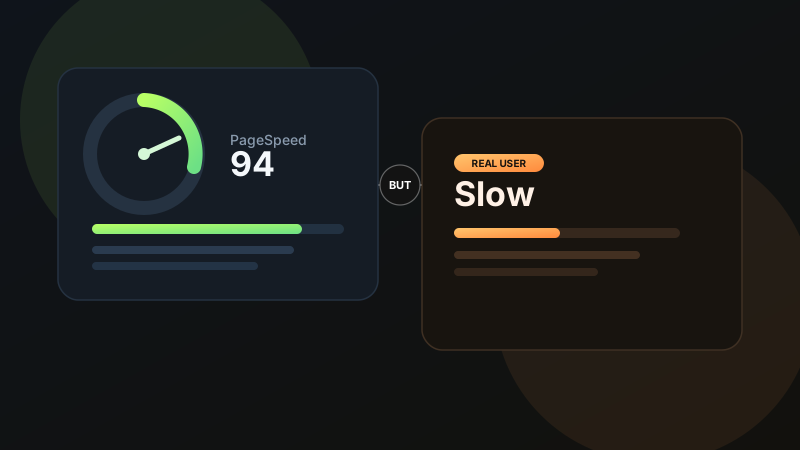
One of the most frustrating conversations in web design goes like this: the developer shows a strong Google PageSpeed score, but the client opens the site on their phone and says, "it still feels slow." Both people can be right. A page can test well in lab conditions and still feel sluggish to real users because performance is not just a score, it is a lived experience.
PageSpeed helps diagnose technical issues, but real-world speed depends on devices, networks, scripts, rendering strategy, and how the interface behaves after the first paint.
01 Lab performance and real-world performance are different things
Google PageSpeed Insights mixes lab analysis with field data, but most people fixate on the synthetic score. That score is useful, but it does not fully represent what a real visitor experiences on a mid-range Android phone, poor Wi-Fi, background apps running, and several browser tabs already open. Real users bring messy conditions. Lab tests bring controlled ones.
That gap matters because users do not care whether your Largest Contentful Paint improved by 300 milliseconds if the page still hesitates when they tap, scroll, or open a menu. Perceived performance is shaped by interaction readiness just as much as initial load. This is why strong UI design principles still matter in performance work, clarity and feedback can make a product feel dramatically faster.
02 JavaScript can be the real bottleneck
A page can load visible content quickly and still feel slow if too much JavaScript runs immediately after. This is especially common in modern frontend stacks where hydration, client-side state, analytics, chat widgets, sliders, animation libraries, and tracking scripts all compete for the main thread. The user sees the page, but the browser is still busy becoming interactive.
This is where sites often fail the human test. The page appears ready, but taps lag, inputs pause, and scrolling stutters. Users experience that as slowness even if the score looks respectable. If your site is animation-heavy, the same caution applies to motion code too, especially on mobile. My GSAP guide goes deeper on keeping motion expressive without turning the main thread into a traffic jam.
Common causes of "looks loaded, feels slow"
- Heavy hydration after the first render
- Too many third-party scripts loading at once
- Large bundles shipped to low-end mobile devices
- Expensive scroll, resize, or animation handlers
- Slow APIs that block useful interaction
03 Core Web Vitals are not the whole story
Core Web Vitals are important, but they are still only part of the performance picture. A page may pass LCP, CLS, and even INP ranges and still feel rough if content reveals too slowly, if critical actions are visually hidden behind fancy transitions, or if the interface waits too long before confirming user actions. Good UX performance is both technical and behavioral.
For example, a delayed card animation sequence can make a page feel theatrical instead of fast. A skeleton screen that lingers too long can make users think data is still loading even when it is already available. A slow-loading hero image can be partially offset by strong content hierarchy and immediate feedback, but only if the layout itself is well considered. That is why performance and design systems are deeply related: cleaner systems produce cleaner rendering paths and more predictable interaction patterns. If you are building that foundation, my guide on scalable design systems is a useful companion.
04 Device quality changes everything
A high-end laptop can hide performance problems that lower-end phones expose instantly. Many teams build and test on fast machines, then assume the product is universally fast. It is not. CPU power, memory pressure, thermal throttling, and mobile browser constraints all shape how fast your site feels in the real world.
This is one of the biggest reasons real-user speed diverges from PageSpeed confidence. What feels instant on a MacBook Pro may feel sticky on a budget Android device. If your audience is mobile-first, low-end device testing should be part of your normal workflow, not a final check. The same applies to prototype and interaction testing in design: workflow quality upstream usually determines smoothness downstream. That is also why I spend so much attention on UX workflow before polishing screens.
The question is not "is the page technically loaded?" The question is "can a real person use it comfortably on a real device?"
05 Third-party tools quietly slow everything down
Tag managers, live chat, heatmaps, A/B testing tools, embedded videos, consent layers, and social widgets are some of the most common reasons a "fast" site becomes slow in production. They are often added one by one, each justified independently, until the main thread is crowded and the network is saturated.
The problem is not that third-party tools are always bad. The problem is that they are rarely treated like performance budgets. If a tool does not materially improve revenue, support, or insight, it may be costing more in speed than it returns in value.
What to audit first
- Analytics and tag manager load order
- Chat widgets and session replay tools
- Large embedded media blocks
- Unused app plugins and marketing scripts
- Fonts, icon packs, and unused frontend libraries
06 Perceived speed is a design problem too
Users do not experience Lighthouse metrics directly. They experience waiting, hesitation, uncertainty, and responsiveness. This means performance work is also interface work. Clear loading states, immediate button feedback, less blocking motion, smaller visual payloads, and strong information hierarchy all reduce the emotional cost of waiting.
Sometimes the right fix is architectural. Sometimes it is simply reducing noise and showing useful content sooner. Micro-interactions can help here when they reinforce progress rather than delay it. When used badly, they add friction. When used well, they make systems feel alive and trustworthy. I cover that tension in more detail in my article on micro-interactions.
07 What to do when users still say the site is slow
Start with field data, not ego. Look at real-user metrics. Test on weaker devices. Record long tasks. Profile JavaScript. Audit third parties. Check interaction readiness, not just page paint. And then pair the technical fixes with design decisions that reduce hesitation and surface useful content faster.
If you do only one thing after reading this, stop treating performance as a report card and start treating it as part of product experience. That shift changes what you measure, what you cut, and what you prioritize.
A fast score is not the same as a fast feeling
The real goal is not to impress PageSpeed. It is to make your product feel confident, responsive, and frictionless in the hands of actual people. If your team is optimizing scores but users still complain, trust the users. That is where the real performance problem lives. If you want help improving both technical and perceived performance, you can get in touch here.
FAQ
Common questions about Google PageSpeed Is Optimized, But Real User Speed Is Still Slow: Why?
A quick summary of the most common questions readers have about this topic.
Because lab scores and real-world experience are not the same. Real users have slower devices, unstable networks, third-party scripts, interaction delays, and browsing patterns that synthetic tests do not fully capture.
No. A high score is helpful, but it does not guarantee that the site feels fast during real browsing, especially after hydration, user interaction, or third-party script loading.
Check Core Web Vitals field data, JavaScript execution cost, hydration delays, image delivery, third-party scripts, API latency, and how the site behaves on lower-end mobile devices.
Yes. Heavy motion, delayed content reveals, scroll effects, and unnecessary transitions can make an otherwise optimized site feel sluggish or unresponsive.
Real user performance is more important. Scores are useful diagnostics, but the actual goal is how quickly users can see, understand, and interact with the page.