A design system is the difference between a product that feels consistent and one that slowly collapses under its own inconsistency. Done right, it becomes the single source of truth your entire team, designers, developers, and product managers, can rely on. This guide walks through exactly how to build one that grows with your product rather than holding it back.
01 What Is a Design System?
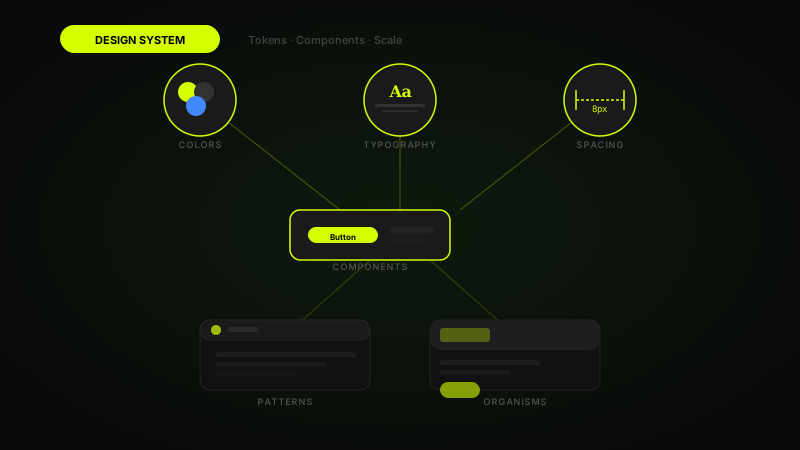
A design system is not just a UI kit or a style guide, it is a living collection of reusable components, design decisions, and the documentation that connects them. Think of it as the grammar rules of your product's visual language: it defines how things look, behave, and communicate meaning to users.
The most successful design systems, like Google's Material Design, IBM's Carbon, and Atlassian's Design System, share one thing in common: they were built to serve teams, not impress stakeholders. Before you open Figma or write a single line of code, get crystal clear on who will use your system, how frequently they'll contribute to it, and what problem it is solving right now.
If you haven't read my article on 10 UI design principles, start there, many of those principles become the philosophical foundation of a design system's decisions around spacing, hierarchy, and colour.
02 Start With Design Tokens
Design tokens are the atomic values that drive every visual decision in your system: colour, typography, spacing, border-radius, shadows, and motion durations. They are stored as named variables, color-primary-500, spacing-md, radius-lg, and are consumed by both your design files and your codebase simultaneously.
The key distinction to make early is between global tokens (raw values like #6C47FF) and semantic tokens (purpose-driven aliases like color-action-primary). Semantic tokens are what you should reference in components, because they allow you to swap out an entire theme without touching a single component. Tools like Figma Variables and Style Dictionary make this handoff from design to code seamless.
When defining spacing, resist the urge to use arbitrary numbers. Adopt a base-8 or base-4 grid and define a finite scale: 4, 8, 12, 16, 24, 32, 48, 64, 96. Every margin, padding, and gap in your entire product should map to one of these values, no exceptions.
"Tokens are not just a technical convenience, they are a contract between design and engineering that prevents the slow drift of inconsistency."
03 Build Your Component Library
Start with the components your product uses every day, not every component you might someday need. A practical first-pass list includes: buttons, inputs, form fields, modals, tooltips, badges, navigation elements, and cards. Build these first, make them robust, then expand.
Each component should be built in layers. In Figma, use Auto Layout for every component so it handles content resizing gracefully. Use variants to cover all states: default, hover, active, disabled, focus, and error. In code, build each component as a pure, stateless unit that receives props, avoid hardcoding colours or spacing values directly in component files.
My UX workflow for component building follows a strict rule: prototype the interaction first, then build the component. This ensures every component is designed around a real user behaviour rather than an aesthetic preference.
Component Quality Checklist
- All interactive states are covered (default, hover, active, disabled, error, focus)
- Component uses tokens for every visual property, no hardcoded values
- It is accessible: correct ARIA roles, keyboard-navigable, sufficient contrast
- Figma component uses Auto Layout and responds correctly to content changes
- Storybook or equivalent documentation exists with usage examples
04 Write Documentation That Gets Read
The graveyard of design systems is littered with documentation nobody reads. The reason is almost always the same: the docs describe what a component looks like, not when and why to use it. Good documentation answers three questions, what is it, when should I use it, and when should I not use it.
For each component, write a short "Usage guidance" section that includes real product examples, not abstract diagrams. Show the component in context: inside a form, inside a card, inside a modal. Show the wrong usage too, a "Danger Zone" section listing common misuses is often more valuable than any amount of correct-use examples.
Keep documentation in the same place developers already work. Storybook is the industry standard for this reason, it lives inside the codebase, stays in sync with the actual components, and can be updated as part of the same pull request that changes the component itself.
"A design system without great documentation is just a Figma file with good intentions."
05 Versioning and Governance
A design system is a product, and like any product it needs versioning. Use semantic versioning: major versions for breaking changes, minor versions for new components, patch versions for bug fixes. Communicate version changes through a clear changelog that every consumer of the system can follow.
Governance defines who can change the system and how. Without it, the system becomes a free-for-all where every team adds their own one-off components and tokens drift back into chaos. A lightweight governance model includes: a weekly design system office hours, a contribution process for new components (propose → review → build → document → release), and a deprecation policy for removing outdated components with a migration path.
The micro-interactions in your system also need governance, define allowed animation durations and easing curves as tokens, and enforce them during code review. Motion that feels inconsistent between components is one of the most common signs of a system that has lost control.
Governance Must-Haves
- A public contribution guide with clear steps from proposal to release
- Semantic versioning with a maintained CHANGELOG
- A deprecation policy: minimum 2 versions notice before removal
- A dedicated Slack channel or forum for questions and proposals
06 Signs Your Design System Is Working
The return on a design system is rarely visible on a single screen, it shows up in how fast your team ships, how consistent new features look, and how rarely engineers ask designers to clarify specs. Track adoption rate (what percentage of product UI uses system components), contribution rate (are teams adding back, not just consuming), and design-to-dev handoff time.
A healthy design system gets contributions from product teams, not just the design system team. When an engineer opens a pull request to add a new token or a designer proposes a new component variant, that is the clearest sign the system has become part of your team's culture, not just a deliverable.
Audit your product quarterly: open five random screens and check how many UI elements use system components versus one-offs. If adoption is below 80%, investigate the friction points, usually it is either missing components, poor documentation, or a slow contribution process, all of which are fixable.
Building a design system is a long-term investment, but the returns compound over time: faster shipping, fewer inconsistencies, and a product that feels intentional at every touchpoint. Start small, stay disciplined with tokens, and treat documentation as a first-class deliverable, not an afterthought. Your future self, and your entire team, will thank you for it.
FAQ
Common questions about How to Build a Design System That Scales With Your Product
A quick summary of the most common questions readers have about this topic.
A design system is a shared set of reusable components, tokens, guidelines, and documentation that helps teams create consistent digital products at scale.
Start with design tokens and the most frequently used components, then document usage rules, states, accessibility requirements, and contribution patterns.
Design tokens make visual decisions reusable and consistent across design and code. They help teams scale themes, spacing, typography, and colours without hardcoded drift.
Treat it like a product: version it, maintain documentation, define ownership, review contributions, and evolve it alongside the actual product.
Yes, although it can start lightweight. Even a small shared library of tokens and components reduces inconsistency and speeds up design and development.